
Whether you’re managing a maintenance shutdown, equipment installation, construction project or major inspection programme, keeping plans aligned with what’s actually happening on site can be a challenge.
The schedule lives in one system. The work happens in another. Progress updates rely on phone calls, spreadsheets or end-of-day reports, leaving project managers trying to piece together an accurate picture of what’s really happening.
Projects, the latest WorkfloPlus feature, changes that.
By bringing planning and work execution together in one platform, Projects gives you a live view of every phase of work, helping you coordinate teams, track progress and keep programmes moving without switching between multiple systems.
Plan the Way You Already Think
Every project starts with a plan.
With Projects, you can build that plan around the natural stages of your work. Create a project, divide it into phases, and populate each phase with the same WorkfloPlus Jobs your teams already use every day.
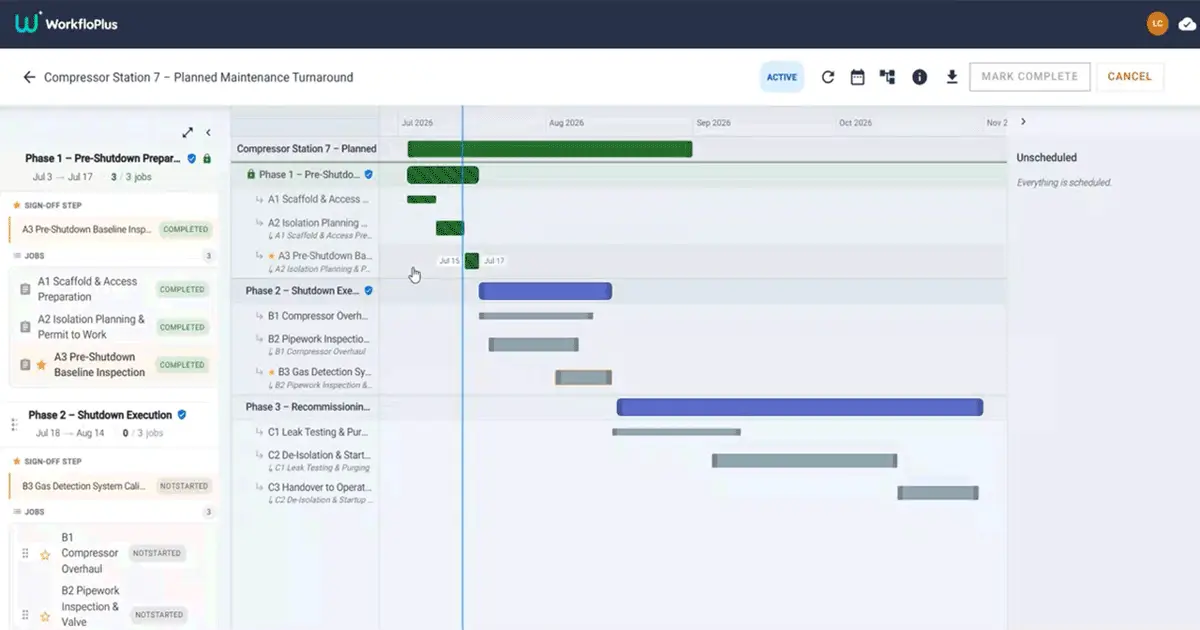
Scheduling is quick and intuitive. Simply drag and drop jobs onto a visual timeline, define dependencies, and instantly see how each activity fits into the wider programme. Whether you’re planning a week-long installation or a multi-month infrastructure project, everyone is working from the same schedule.
Imagine a planned maintenance shutdown. The first phase covers isolations, access and inspections. The second focuses on maintenance activities, while the final phase manages testing, recommissioning and handover. Every job is planned in one place and connected directly to the work being carried out in the field.
The Schedule Updates Itself
The biggest difference between Projects and a traditional planning tool is that the schedule isn’t static.
Because every task in your project is a live WorkfloPlus Job, progress updates automatically as work is completed. Finished jobs are reflected immediately, phase progress updates in real time, and any delays become visible as they happen rather than at the end of the day.
Instead of chasing updates or manually maintaining spreadsheets, you always have an accurate picture of where the project stands.
That means less administration, faster decision making and greater confidence that your programme is staying on track.
Built for Real Operational Work
Many planning tools stop once the schedule has been created.
Projects continues all the way through execution.
Photos, readings, signatures and other evidence are captured as each job is completed. Creating a complete audit trail without any additional effort. Where formal approvals are required, designated sign-off jobs ensure a phase can’t be completed until the appropriate checks have taken place.
Once a phase has been signed off, it becomes read-only, preserving a permanent record of what was completed, when it happened and who carried out the work. It’s a simple way to strengthen governance while maintaining the flexibility teams need to keep work moving.
One Version of the Truth
The biggest benefit of Projects is that planning and work execution are no longer separated.
The people planning the work and the people carrying it out are working from the same information. Progress is visible in real time, dependencies are clear, and everyone has confidence they’re looking at the latest version of the schedule.
- For project managers, that means fewer surprises.
- For frontline teams, it means clearer priorities.
- For the business, it means better visibility, stronger compliance and more predictable project delivery.
Available Now in WorkfloPlus
Projects is available now as part of WorkfloPlus.
If you’re already using WorkfloPlus, you can start planning and managing programmes of work using the same workflows, teams and processes you already know. If you’re new to WorkfloPlus, Projects offers another way to connect planning with execution, giving you greater visibility and control from the first task to the final sign-off.
Book a demo to see how Projects can help you plan smarter, execute with confidence and keep projects on track.